Proposal walkthrough
A set of analysis templates — Jupyter notebooks that take an admin area, a hazard and an event as parameters — run automatically or on demand, and publish as static HTML anyone can browse, share and reproduce. A thin Django app indexes them and orchestrates the runs.
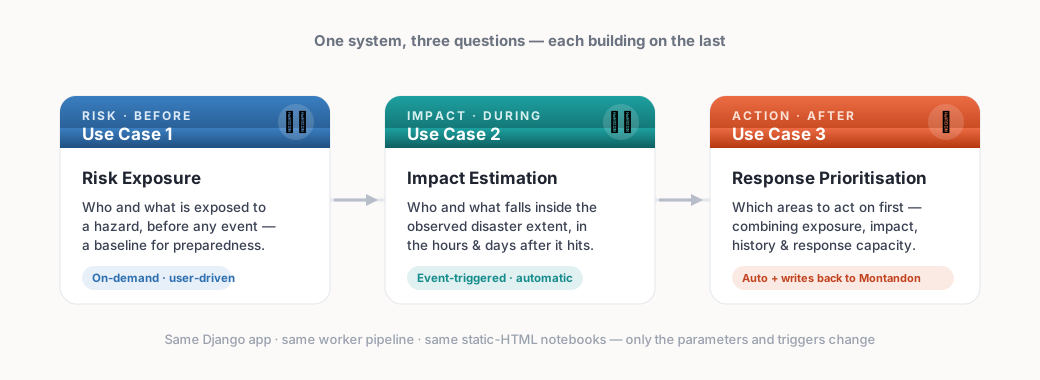
One system, three questions
The three use cases build on one another — from who is at risk before an event, to who was hit when it strikes, to where to act first. Same app, same pipeline, same notebooks; only the parameters and the trigger change.
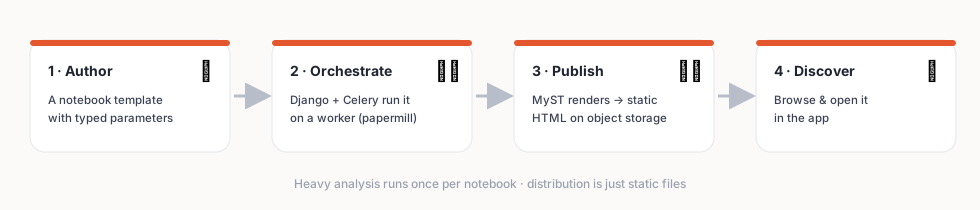
The whole idea
An analyst writes a notebook template that declares its parameters. The Django app orchestrates a worker that runs the notebook with real parameters, renders it to HTML, and publishes it to object storage. Users browse and open the results — the heavy analysis has already happened.
Two ways in
Follow the journey — author or pick an analysis, choose an admin area and parameters, run it, and open the published result. No code required.
Walk through the app →
Django API + notebook index, Celery workers running papermill, MyST rendering to static HTML, object storage, and event-driven triggers — on the IFRC GO stack.
See the architecture →
Design principles
The expensive analysis runs a single time per notebook. Outputs are frozen artifacts.
Results are HTML files on object storage — served directly, bypassing the app and database.
Django stores only light metadata & links. Notebook content never touches the database.
Every output is a real notebook. Re-run it locally, swap data sources, change parameters.
Explore the plan
The end-to-end user journey: author → browse → select → generate → view → notify.
Open →
Risk exposure, post-disaster impact, and response prioritisation — data, method and triggers.
Open →
Django, Celery, papermill, MyST, object storage, the data model, and the sharp edges.
Open →
On-demand, scheduled polling, and event-driven runs that write back to Montandon & the Charter.
Open →